
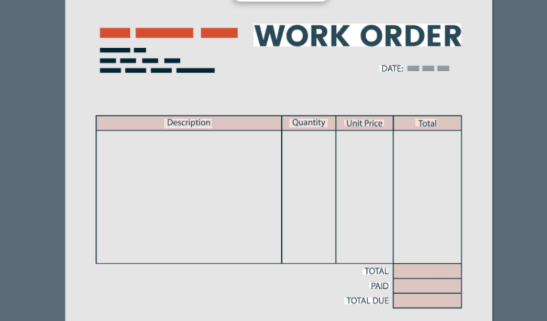
Work Order:
A work order is an important document used in many businesses and industries. It helps companies organize tasks, track work, and communicate clearly with employees or service providers. Whether it is maintenance work, construction, or repair services, a makes sure that everyone understands what needs to be done.
In simple words, a is a written request that explains a job that must be completed.
This article will explain what a is, why it is important, how it works, and the different types of work orders.
What Is a Work Order?
A work order is a document that describes a specific task or job that needs to be completed. It is usually created by a manager, supervisor, or client and given to workers or technicians.
The work order includes important details such as the following:
- Description of the task
- Location of the job
- Required tools or materials
- Deadline for completion
- Name of the person responsible
Work orders are commonly used in industries like maintenance, manufacturing, construction, facility management, and IT services.
For example, if a machine in a factory stops working, the manager can create a work order for the maintenance team to repair the machine.
Why Work Orders Are Important
Work orders help businesses stay organized and efficient. Without proper tasks may be forgotten, delayed, or completed incorrectly.
ALSO READ;.https://weblibrarys.com/wps-meaning/
Here are some key reasons why work orders are important:
1. Clear Communication
A work order clearly explains what work needs to be done. This helps workers understand their tasks without confusion.
2. Better Organization
Companies can track multiple jobs easily with .It helps managers know what tasks are pending, in progress, or completed.
3. Improved Accountability
Work orders show who is responsible for completing the job. This increases responsibility and productivity.
4. Record Keeping
Work orders create a history of completed tasks. Businesses can review these records to improve operations in the future.
5. Cost Control
Work orders often include material and labor details. This helps companies monitor costs and control spending.
Types of Work Orders
There are different types of work orders depending on the type of job or industry.
1. Maintenance Work Order
This is used to repair or maintain equipment, machines, or buildings.
Example: Fixing a broken air conditioner in an office.
2. Inspection Work Order
This type is created when equipment or systems need to be checked regularly.
Example: Inspecting safety equipment in a factory.
3. Preventive Maintenance Work Order
This work order helps prevent problems before they happen.
Example: Regular servicing of machines to avoid breakdowns.
4. Emergency Work Order
This is used for urgent tasks that must be completed immediately.
Example: Repairing a water leak in a building.
What Information Is Included in a Work Order?
A standard work order usually contains the following details:
- Work order number
- Description of the task
- Name of the worker or technician
- Location of the job
- Required materials and tools
- Priority level
- Start date and deadline
- Approval signature
These details help ensure the task is completed correctly and on time.
How the Work Order Process Works
The work order process usually follows several steps.
1. Request
A problem or task is identified, and someone submits a work request.
2. Approval
A manager reviews the request and approves it if necessary.
3. Creation
A is created with all job details.
4. Assignment
The is assigned to the appropriate worker or team.
5. Completion
The worker completes the job and updates the.
6. Review and Close
The manager reviews the completed work and closes the work order.
This process helps companies manage work efficiently and avoid mistakes.
Digital Work Orders vs. Paper Work Orders
Many businesses now use digital work order systems instead of paper documents.
Paper Work Orders
- Written on paper forms
- Can be lost or damaged
- Harder to track and update
Digital Work Orders
- Created using software or apps
- Easy to track and update
- Faster communication
- Better data storage
Digital systems help businesses save time and improve productivity.
Tips for Creating an Effective Work Order
To make work orders more useful, companies should follow some simple tips:
- Write clear and simple instructions
- Include all necessary details
- Set realistic deadlines
- Assign the task to the right person.
- Track progress regularly
Good work orders help teams complete tasks quickly and efficiently.
Conclusion
A work order is a simple but powerful tool used to manage tasks and organize work. It helps businesses communicate clearly, track progress, and improve efficiency.
From maintenance and repairs to inspections and emergency tasks, ensure that every job is completed properly and on time.
As businesses continue to grow, many organizations are switching to digital systems to manage tasks faster and more effectively.
Using a well-organized work order system can save time, reduce costs, and improve overall productivity.
Frequently Asked Questions (FAQs)
- What is a work order in simple words?
A work order is a document that explains a job or task that needs to be completed by workers or technicians.
- Who creates a work order?
A work order is usually created by a manager, supervisor, or customer who requests a task to be completed.
- What is the difference between a work request and a work order?
A work request is a request for a job, while a work order is the official document that approves and assigns the task.
- What industries use work orders?
Work orders are commonly used in maintenance, construction, manufacturing, facility management, and IT services.
- Why are digital work orders better?
Digital work orders are easier to track, update, and store. They also help businesses improve efficiency and reduce paperwork.