
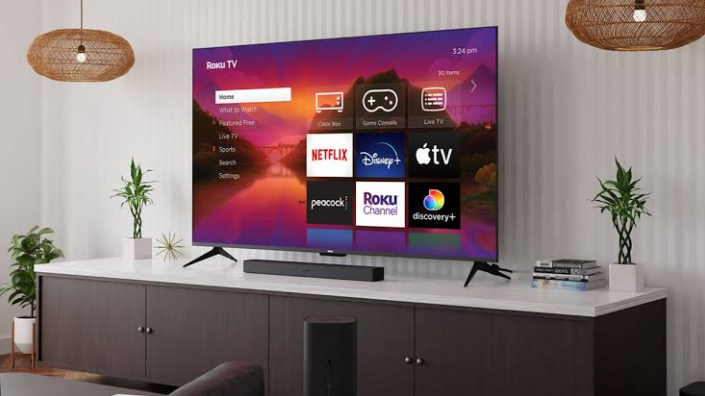
Smart TVs:
Smart TVs have transformed the way people enjoy entertainment at home. Unlike traditional televisions, they connect to the internet, allowing users to stream movies, watch live TV, browse the web, play games, and even control smart TV home devices. Whether you’re a movie enthusiast, a sports fan, or a gamer, a Smart TV offers a modern entertainment experience that combines convenience, quality, and advanced technology.
As technology continues to evolve, smart TVs have become more affordable and feature-rich. They are now available in various sizes, resolutions, and operating systems, making it easier than ever to find a model that suits your needs and budget.
What Are Smart TVs?
Smart TVs are internet-enabled televisions with built-in operating systems that provide access to streaming services, apps, and online content without requiring additional devices. Popular streaming platforms such as Netflix, YouTube, Disney+, and Amazon Prime Video can be accessed directly from the TV.
Most smart TVs also include Wi-Fi connectivity, voice assistants, app stores, screen mirroring, and regular software updates to improve performance and security.
Key Features of Smart TVs
1. Internet Connectivity
One of the biggest advantages of Smart TVs is their ability to connect to the internet through Wi-Fi or Ethernet. This allows users to stream videos, browse websites, and download apps.
2. Streaming Services
Smart TVs support a wide range of streaming platforms, giving users access to thousands of movies, TV shows, documentaries, and live sports without needing a cable subscription.
3. Voice Control
Many modern smart TVs include voice assistants such as Google Assistant or Amazon Alexa. Users can search for content, adjust the volume, change channels, or control compatible smart home devices using voice commands.
4. High-Quality Display
Today’s Smart TVs offer impressive picture quality with Full HD, 4K Ultra HD, and even 8K resolution. Features such as HDR (High Dynamic Range) provide brighter colors, deeper contrast, and more realistic images.
ALSO READ;https://weblibrarys.com/enterprise-technology/
5. App Store Access
Users can download entertainment, music, fitness, education, and gaming apps directly from the smart TV’s app store, expanding its functionality beyond watching television.
Benefits of Smart TVs
Easy Access to Entertainment
With Smart TVs, there is no need for multiple external devices to access streaming platforms. Everything is available from one screen.
Better User Experience
Modern smart TV interfaces are designed to be simple and user-friendly, making navigation quick and convenient.
Smart Home Integration
Many Smart TVs work seamlessly with smart lights, security cameras, thermostats, and other connected devices.
Wireless Screen Mirroring
Users can display photos, videos, presentations, and mobile apps directly from smartphones, tablets, or laptops.
Regular Software Updates
Manufacturers frequently release smart TV updates that improve security, performance, and compatibility with new apps.
Things to Consider Before Buying Smart TVs
Screen Size
Choose a screen size. Smart TVs based on your room dimensions and viewing distance. Larger rooms generally benefit from larger displays.
Display Resolution
For the best viewing experience, 4K Smart TVs provide exceptional clarity and have become the standard choice for most buyers.
Operating System
Different brands use different operating systems, including Android smart TVs. Google Select one that offers the apps and features you use most.
Connectivity Options
Look for Smart TVs with multiple HDMI ports, USB ports, Bluetooth, Wi-Fi, and Ethernet support to connect gaming consoles, sound bars, and other accessories.
Audio Quality
While many smart TVs have decent built-in speakers, users seeking a cinematic experience may prefer adding a sound bar or home theater system.
Smart TVs for Gaming
Gaming has become one of the biggest reasons people upgrade to Smart TVs.
Many newer models feature the following:
Low input lag
High smart TV refresh rates
HDMI 2.1 support
Variable Refresh Rate (VRR)
Auto Low Latency Mode (ALLM)
These features smart TVs provide smoother gameplay and a more responsive gaming experience for console and PC gamers.
Smart TVs and Home Office Use
Smart TVs are no longer limited to entertainment. Many people use them for video conferencing, online classes, presentations, and productivity. Screen casting allows laptops and mobile devices to display content on a larger screen, making meetings and learning more comfortable.
Tips for Maintaining Smart TVs
Proper care can extend the lifespan of your smart TVs.
Keep the screen clean using a microfiber cloth.
Install software updates regularly.
Use a surge protector to prevent electrical damage.
Avoid displaying static images for long periods.
Maintain good ventilation around the TV.
Use strong passwords for connected accounts.
Future of Smart TVs
The future of smart TVs looks promising. Artificial intelligence will continue to improve content recommendations, voice recognition, and picture optimization. New technologies such as Mini LED, Micro LED, and advanced OLED displays will deliver even better brightness, contrast, and energy efficiency.
Cloud gaming, virtual reality integration, and faster internet connectivity will further enhance the smart TV experience, making these devices central to modern digital homes.
Conclusion
Smart TVs have become an essential part of modern home entertainment. They combine internet connectivity, streaming services, voice control, and outstanding picture quality into one convenient device. Whether you enjoy movies, gaming, sports, or online learning, Smart TVs offer flexibility and features that traditional televisions cannot match. By choosing the right screen size, display technology, and operating system, you can enjoy years of high-quality entertainment and connectivity.
FAQs
- What are Smart TVs?
Smart TVs are televisions with built-in internet connectivity and operating systems that allow users to stream content, install apps, and access online services.
- Do Smart TVs need an internet connection?
Yes, an internet-smart TV connection is required to access streaming services, apps, and online features. However, they can still function as regular TVs without internet.
- Which resolution is best for Smart TVs?
Smart TVs: For most users, 4K Ultra HD offers an excellent balance of picture quality, content availability, and value.
- Can I install apps on Smart TVs?
Yes. Most smart TVs include an app store where users can download streaming, gaming, music, and utility applications.
- Are Smart TVs good for gaming?
Yes. Many modern smart TVs support gaming features such as HDMI 2.1, low input lag, high refresh rates, and VRR for smoother gameplay.
- How long do Smart TVs usually last?
With proper maintenance, a quality Smart TV typically lasts between 7 and 10 years, depending on usage and build quality.
- Can Smart TVs connect to smartphones?
Yes. Most smart TVs support screen mirroring, casting, or wireless connectivity with Android and iPhone devices.
- Are Smart TVs secure?
Smart TVs are generally secure when users install software updates, use strong passwords, and download apps only from official app stores.