
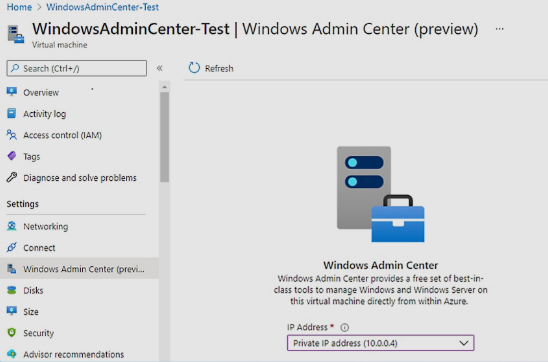
Windows Admin Center:
Managing servers and computer systems can be complex, especially for IT administrators. To make this process easier, Microsoft created Windows Admin Center, a modern management tool for Windows environments.
This platform allows administrators to manage servers, computers, clusters, and infrastructure from a single web-based dashboard. In this article, we will explain what Windows Admin Center is, how it works, its features, and why many IT professionals use it.
What Is Windows Admin Center?
Windows Admin Center is a browser-based management tool designed for Windows servers and PCs. It helps IT administrators control different system tasks from one place.
This tool was developed by Microsoft to replace several traditional management utilities. Instead of opening many different tools, administrators can manage systems using one simple interface.
Windows Admin Center works locally on a network, which means administrators can manage servers without relying on cloud services.
Why Windows Admin Center Is Important
IT administrators are responsible for maintaining servers, checking performance, and fixing issues. In the past, this work required multiple tools such as Server Manager and remote desktop services.
Windows Admin Center simplifies these tasks by providing a central platform where administrators can:
- Monitor server performance
- Manage storage and networking
- Update systems
- Control user access
- Troubleshoot problems
Because of this centralized approach, it saves Windows Admin Center time and improves efficiency for IT teams.
Key Features of Windows Admin Center
Windows Admin Center includes many useful tools that help administrators manage systems more easily.
1. Server Management
Administrators can manage Windows servers directly from the dashboard. They can check system health, review logs, and control services.
The platform works well with server systems like Windows Server.
2. Performance Monitoring
Windows Admin Center provides real-time performance data. Administrators can monitor:
- CPU usage
- Memory usage
- Disk activity
- Network performance
This helps identify problems before they affect system performance.
3. Storage Management
The tool allows administrators to manage storage resources efficiently. They can create volumes, manage disks, and monitor storage health.
This feature is especially useful for organizations with large data systems.
4. Virtual Machine Management
Windows Admin Center also supports virtualization. Administrators can create, manage, and monitor virtual machines running on systems like Hyper-V.
This makes it easier to control virtual environments without switching between multiple tools.
5. Security Tools
Security is a major concern for IT environments. Windows Admin Center provides security features such as:
- Role-based access control
- Certificate management
- Security updates monitoring
These tools help administrators maintain a secure system environment.
How Windows Admin Center Works
Windows Admin Center runs as a web-based application. Once installed, administrators can open it in a browser and connect to their servers.
The interface shows a dashboard with connected devices and servers. Administrators can select a server and view detailed information about its performance, storage, and configuration.
Because the platform is browser-based, it Windows Admin Center is easy to use on different devices within the network.
Benefits of Using Windows Admin Center
Many organizations use Windows Admin Center because it simplifies server management.
ALSO READ;https://weblibrarys.com/myepp/
Here are some key benefits:
Easy Interface
The dashboard is simple and easy to understand, even for administrators who are new to server management.
Centralized Control
Instead of using many tools, administrators can manage everything from one location.
Remote Management
IT teams can manage servers remotely without needing to log into each machine separately.
Regular Updates
Microsoft regularly updates with new features and security improvements.
Free Tool
One of the biggest advantages is that Windows Admin Center is available for free from Microsoft.
Who Should Use Windows Admin Center?
Windows Admin Center is mainly designed for:
- IT administrators
- System administrators
- Network engineers
- Organizations using Windows servers
Businesses with multiple servers can benefit greatly from using this tool.
It is especially helpful for companies that want a simple and modern management solution.
Tips for Using Windows Admin Center Effectively
To get the most out of Windows Admin Center, administrators should follow some best practices.
Use secure login credentials and limit Windows Admin Center access to authorized users only. Regularly update the platform to ensure the latest features and security patches are installed.
Administrators should also monitor server Windows Admin Center performance regularly to identify potential issues early.
These steps help maintain stable and secure IT systems.
Final Thoughts
Windows Admin Center is a powerful and modern tool that helps IT administrators manage Windows servers and systems more efficiently. With its browser-based interface and centralized dashboard, it simplifies many complex administrative tasks.
Developed by Microsoft, this platform continues to improve with new updates and features. For organizations that rely on Windows infrastructure, Windows Admin Center is an excellent solution for system management.
FAQs
- What is Windows Admin Center used for?
Windows Admin Center is used to manage Windows servers, computers, clusters, and infrastructure through a single web-based dashboard.
- Who developed Windows Admin Center?
Windows Admin Center was developed by Microsoft to simplify server management for IT administrators.
- Is Windows Admin Center free?
Yes, Windows Admin Center is a free tool provided by Microsoft for managing Windows systems.
- Can Windows Admin Center manage virtual machines?
Yes, it supports virtual machine management through platforms like Hyper-V.
- Does Windows Admin Center require internet access?
No, it can run locally within a network, which means administrators can manage servers without needing internet access.